
Is the system the problem, or is the problem the way we use the system?
How can we increase democratic engagement without having to change the system?
A good example of greater democratic engagement through the existing system is the independent group running the small UK town or Frome.
The manner in which this group established an independent council, breaking the decades old monopolistic hold of the Conservative Party, is documented in the book Flatpack Democracy by the council leader, Peter MacFadyen.
I spoke with Peter, and through him was introduced to a number of other independent council groups across the UK, who I interviewed about their campaigns. I have used that information, plus a thorough analysis of Peter’s own campaigns, to draft the following outline for a Democracy Management System (DMS.)
What and why?
This is an outline for a system that manages democratic engagement; a DMS for ‘democratising democracy.’
It uses familiar components; comms, tasks, calendars, etc. It combines these with a few specific features that are particularly relevant to the needs of people when they are organising themselves politically.
As such, this system replaces the organisational overhead of a national political party; it takes all that infrastructure and turns it into a platform that anyone can easily pick up and use.
This is what ‘democratising democracy’ means. Software is often described as democratising something; iMovie democratised film production, Photoshop and Illustrator democratised graphic design, Unity democratised game development, etc.
Democratise, in this context, means taking a function that had been the preserve of a professional cadre and systematising it into a solution that makes the same activity accessible to the public. Today people make movies on their phones, and kids build computer games in their bedrooms. That is the democratisation of media production.
Democracy itself is ripe for the same treatment; involvement in representative democracy should not be limited to well-funded institutions employing rafts of professionals to manage processes that are beyond the scope of the public to replicate. Better public engagement in policy should not depend on abandoning the governance systems we have.
There are significant barriers to getting an independent group of local people elected to local government; this is seen as being the preserve of the party system. The DMS system that developed from my discussions with local councillors is designed to make it easy to run local election campaigns and to then manage ongoing relationships with voters once elected.
That does not mean it could not also be used by established parties, but this system would create a level playing field for independent groups. If used by major parties as well, it would bring them closer to the public they represent.
Personal interest
I have no interest in implementing this project. It is offered as a public domain, opensource framework. I have put this together because as a writer with relevant experience I am able to both investigate the needs and to express them in this kind of framework.
By the time you read this I will be writing about something else. Although this document includes wireframes, use cases, etc. it is a piece of journalism; investigating and analysing. That is the limit of my personal interest.
Benefits
It was clear from the discussions I had with people on the ground running campaigns that the existing technology available is problematic.
The proposed DMS platform combines a set of tools into one opensource system, custom built for local communities organising election campaigns and managing relationships between candidates, elected officials and the public.
The benefits are twofold; simplicity and accountability.
Simplicity
The tools required for running campaigns include;
- Calendar
- Communication
- Campaign management
- Task management
- Team management
- Project management
- Electoral and other regulatory compliance
- Document creation
- Document archiving
- Event management
- Webinar
Most of the tools in this list exist already somewhere on the internet; many are marketed as ‘free of charge;’
- Google Docs
- Dropbox
- X
- Doodle
- Sugar CRM
- Google maps
- GoToMeeting
- Skype
- Photoshop
- WordPress
But trying to bring all these tools together into a unified campaign process can be an enormous hassle, particularly when dozens of team members and volunteers, and hundreds of other stakeholders, are all trying to engage with the process at once.
And many tools that are free at a certain scale suddenly become paid tools when they cross certain number of users, or they require payment to unlock important features. Managing large numbers of users across a dozen applications is the work of a full time systems administrator.
Bringing everything together into a single platform designed specifically for purpose may seem like a pretty minor benefit; an improvement in the efficiency of the admin of running a campaign does not sound like it is transformative of democratic engagement.
But there is a reason corporations spend billions of dollars on integrated systems to manage their products, suppliers, customers, staff, accounts, etc.
The difference between running a campaign using one unified system, and using a dozen applications that don’t speak to each other, have paywalls, were set up by different people at different times and are designed for purpose… well it is the difference between a small group being able to run a campaign easily and a small group of people not being able to run a campaign easily.
This is particularly worth considering in the context of the people putting their hands up to get involved in local government; these are not people who automatically have extensive skills with managing third party software solutions. Reducing the administrative overhead and ensuring that any small group of people who want to run a campaign can do, with one opensource tool, takes a huge roadblock out of the way of more people getting involved in government.
Accountability
Not only does this DMS system make the difference between being able to run an independent campaign easily or not, it also has custom tools built in that are specifically designed to allow elected representatives and constituents to track campaign goals and thus to maintain accountability and ongoing engagement between elected officials and the public.
The platform also addresses the sensitive issue of public and private profiles; the right which the public has to comment anonymously must be balanced against the benefits of identifiable engagement in the public square. The solution is to ensure that both verified and anonymous accounts are supported and that public engagement can be filtered to show results with or without anonymous input.
Cost and governance
The platform I am outlining in this document has lots of features. Implementing all of them would take some time; a few years. But most of the features already exist as opensource modules and most of the development work required is in bringing existing modules together to meet this specific need. There are no unsolved problems in the scope of this work; everything being proposed here has been done many times elsewhere for other types of use.
I would estimate that a team of between three and six engineers could stand up most of this platform in two years. If they were all paid full time salaries, plus management overhead and QA, that would probably cost around $1.5 million. Raising that kind of money is not difficult. Large open source institutions like the Mozilla Foundation could back a project like this. Crowd funding could also raise this kind of sum with the right sort of promotional campaign.
I would strongly recommend anyone developing this project do so on an opensource basis. Existing opensource developer communities may be willing to bootstrap at least some of the work for free. Opensource developers often include very senior and experienced engineers, working inside large tech companies, that want to use their skills for interesting public works in their spare time.
The governance of a project like this, once built, should also learn from the foundations, charities and trusts that oversee Wikipedia, Mozilla, etc. Transparency and independence are obviously essential.
The question of whether a platform like this should charge or not is an interesting one. I think there probably is a justification for having a small fee to campaigns; it is likely to be less than they would spend on other platforms and should justify itself. Perhaps $50 per month, which would cover hosting and support and hopefully provide some ongoing funding for further feature development.
The practical issues
The discussions I had with councillors and candidates highlighted lots of practical frustrations that undermine local groups and soak up vast amounts of time. I have outlined six here as examples. Four relate to the campaigning process itself and two relate to the work involved in being an effective representative once elected.
These are each modules that can be developed and plugged into the DMS system, before or after it is launched.
Campaigning
These are four examples of the problems campaigns are undermined by; issues that have been turned into features in the DMS system.
Issue 1 – Who stands where?
“In my view a failure was the policy of letting people stand where they wanted and then drawing lots. Entirely understandable with a group of independents. But I am sure that we could have got one or two more candidates in if we could have used a bit more persuasion to match candidates and wards.” John Birkett-Smith
Once a list of prospective candidates exists the campaign team must agree who stands for which ward. Should this be based on where candidates live? Or how they match against other candidates standing in each ward? How can different configurations easily be reviewed? How is the final decision taken and published?
One change can upend a proposed allocation. The process is messy, hard to track and can lead to disillusionment and conflict.
The solution – Assign Candidates App
Feature
Opening the Candidate Assignment tool shows all potential candidates and a dynamic map view of wards. A proposed campaign candidate list can be generated by clicking a ward and dragging it to a candidate name or visa versa.
Benefit
This makes it easy to generate and modify configurations without endless scribbling on paper or manually cutting and pasting names in a spreadsheet.
Feature
Candidate Assignment tool shows postcode information for candidates and demographic information for wards.
It also shows incumbent councillors in each ward, party affiliations, and public information about the council officers. The map view will assist candidates in deciding which areas to focus their campaigning activities.
Benefit
This provides all relevant information for supporting the final decision.
Feature
Proposed campaign candidate lists and allocations can be saved as a drafts, all of which can be viewed and compared by team members, pending a final decision and the acceptance of one draft as the official candidate list.
Benefit
This makes it easy for all team members to build one or more proposed configuration and for everyone to review all potential options, and to then prioritise the best and take a final decision.
Issue 2 – Consultation
Large groups of people are hard consult effectively. Some people want to be heard all the time. Some people have issues they are not comfortable voicing in public. Establishing consensus can be impossible without a formal process.
The solution – Identify, Prioritise, Assign (IPA)
A three stage process managed online in real-time or asynchronous terms that allows large and small groups to identify the issues they face, prioritise the most important and assign tasks to different stakeholders in pursuit of solutions.
A moderator leads the process. This can be a real individual or a software wizard.
Identify
Participants are asked to input individual items for each issue they can identify. For instance, an planning application for a wind farm might throw up:
- It will hit tourism because the hills will not be a wilderness any more.
- It will hit farmers because sheep don’t like the noise from wind farms.
- It will prevent the land being sold for a new housing estate.
- It will generate power and potentially surplus income to the town.
Prioritise
The issues are grouped and deduped, with audit trails available in a wiki style, allowing finer distinctions to be returned to if necessary.
Then participants vote on which issues they consider to be the most important – the most in need of action.
Assign
Issues are reviewed and commented on in priority order, with tasks assigned to relevant stakeholders where appropriate.
Benefit
IPA processes gather issues anonymously, allowing all participants to speak honestly without fear of judgement by their peers.
Issues are voted on ensuring the priorities of a noisy few do not dominate the conversation.
The group is automatically taken through a process that leads from problems to solutions, ending in a clear understanding of who needs to do what before important issues can be resolved.
Issue 3 – Media assets
“Seek expertise in design.” Peter Macfadyen. Creating effective posters and other campaign materials depends on the campaign team having access to graphic design skills.
Poor materials can undermine a new team’s ability to engage a wider audience. Established parties may have internal knowledge of successful past campaigns to draw from.
The solution – Dynamic Media Library
Feature
Dynamic, pre-populated templates – Teams can configure poster, flier, button, and online graphics templates which, when reviewed, automatically pull the campaign name, election details and other known data sets into the design templates as initial drafts that can then be selected and edited.
Benefit
This feature is similar to a personalised greeting card website (moonpig.com or funkypigeon.com). It allows teams to instantly “stress test” their campaign identity before final confirmation of their campaign name – by presenting draft names in the context of the campaign literature they are likely to use.
Benefit
The feature also makes it easy for anyone to choose and produce high quality designed templates that can be modified. Campaign teams no longer start from a blank sheet of paper.
Feature
Shared library – The library of templates available to any campaign team will grow over time, with every campaign team’s posters available as templates in the shared library.
Benefit
Over time the quality and effectiveness of campaigns will grow, as constant crowd driven iterations of templates improves and expands the library of resources.
Issue 4 – Ground logistics
With a number of volunteers to co-ordinate and a potential wide spread of voters, there is a need to ensure that the right people are getting the right message. Leaflets cost money and delivering them costs volunteer time, these resources need to be efficiently deployed.
The solution – Interactive Constituency Map
Feature
Co-ordinators can allocate particular streets to particular volunteers, and indicate which leaflet should be delivered there.
Benefit
Allows for targeted messaging and ensures that leaflets are not wasted by being delivered to the same street more than once.
Feature
Volunteers can mark tasks as complete to indicate that they have delivered their leaflets to the streets indicated. They can also add how many leaflets are left over, or if they ran out before completing their allocated streets.
Benefit
Allows users to see which streets have already received literature and reduces wastage.
Feature
Streets on the map will display in different colours to indicate that they have received literature, that they are due to be delivered to, or that they have neither had a leaflet nor are any deliveries planned.
Benefit
Allows campaign teams to see at a glance which areas they need to focus on. Allows volunteers to select streets in their area and offer to deliver leaflets there.
Administrating
Talking to the councillors it was clear that the challenges involved in serving the public do not end when a grassroots campaign succeeds in getting a group elected; that is when the real work starts.
Issue 5 – Grant application complexity
“I don’t have time for this!” Pam Barrett. Applying for grants at all financial levels can be practically impossible for small town councils to manage.
Application forms are usually online and can only be accessed by one person. The applying party is often driven to recreate the entire form in Word or similar just to be able to share it with other team members involved in the application.
Competitive pressure, particularly within geographic zones, can undermine the willingness of applicants to share knowledge and build expertise, leaving everyone constantly reinventing the wheel and never clear on what best practice looks like.
The solution – Form interpreter
Feature
A combination of machine intelligence and crowd effort trains an AI agent to replicate grant forms as shareable assets within the DMS.
Form generation will seek to pull field title, criteria and other metadata from the original form.
Benefit
Individual managers responsible for filing applications and quickly generate a shareable interactive version of the form with their team, allowing information to be gathered and input in acceptable formats.
Feature
The granting body can be sent a copy of the shareable form, with recommended best practice for ease of interpretation of future forms
Benefit
Grant bodies to consider how they format their information requests and where information fields can be standardised across bodies.
Feature
Completed, successful and unsuccessful applications now exist in a shareable network and can be sent at the discretion of the creator to teams in non-competing territories, or shared to the common public repository after an appropriate period of time.
Benefit
Applicants can easily share information with specific teams without undermining their existing applications. Over time best practice can emerge and a common knowledge pool can grow, making it easier for smaller groups with less human resources available to apply for grants that otherwise are only practically accessible to larger, better resourced teams.
Issue 6 – Ongoing engagement
Communities are often unaware of how budgets are spent. Many people do not know what could be done by their local elected officials, or what the implications of different decisions are.
This leads to representatives taking decisions either based on no useful information, or biased toward their own personal interests or the interests of people close to the council willing and able to push for special consideration.
The solution – Participatory budgeting
(It puts the fun back in funding!)
Features
Available budget assignment
The council identifies a discretionary funding pool; either from existing resources of future potential resources, via tax or public borrowing.
Proposal listing
The council put forward proposals for use of the funds and seek additional proposals from the public.
Proposal costing
Popular proposals are costed.
Public vote
The public is offered a binding vote on how resources are allocated.
Benefits
The public own the decision making process.
They can directly associate any increase in borrowing or tax with specific popular expenditure.
Budget decisions are not high jacked by small groups with unpopular goals.
Wireframes
The following pages show basic designs for the core of this system, with notes explaining each page. It should be clear that bringing all these components under one custom built framework releases enormous value, making it easy for non technical people to sign up and create campaigns that can run smoothly and constantly engage larger groups of constituents, during and after campaigns, reviving engagement in local government and diversifying the pool of experienced and knowledgeable candidates and public servants.
As well as providing a unified set of tools that have been optimised for this task, DMS also includes custom views and templates.
Views
DMS is designed to track the processes different groups and individuals pursue during a political campaign cycle; from starting a new group of potential candidates through to managing stakeholder groups and campaign targets post election.
At each step of the process the DMS highlights relevant tasks and document templates.
Critical steps include;
- Campaign team creation
- First public meeting
- Candidate selection
Templates
DMS contains templates for;
- Email communications
- Posters
- Fliers
- Statement of Intent documents
- Way of Working statements
- Campaign websites
- Press releases
The following wireframes provide the tools and views required to run a campaign as defined for me by MacFadyen and the other councillors I spoke to;
- Create account
- Create campaign
- Campaign dashboard
- Shortlist potential candidates
- Schedule meeting
- Online meeting
- Assign tasks
- First team meeting – tasks and templates
- Dynamic media templates
- Assign candidates
- Campaign commitments
1. Create account
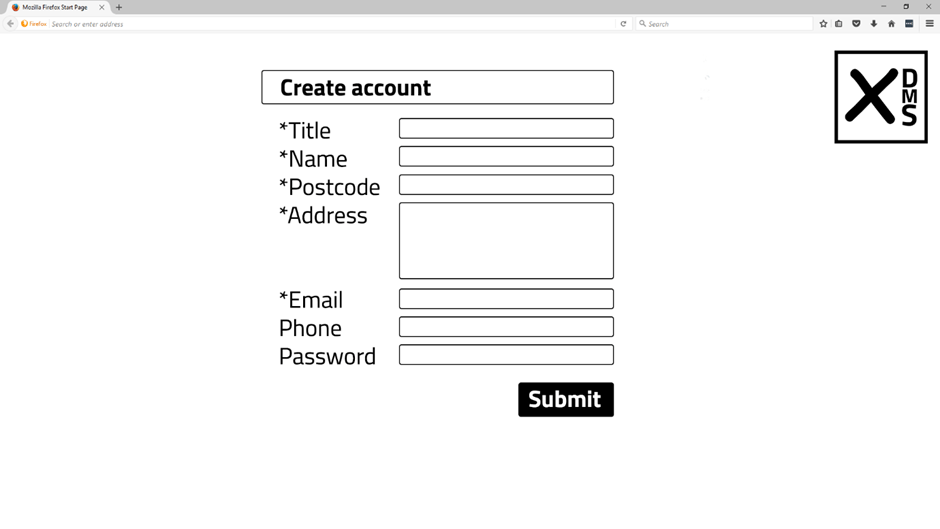
This process should be as simple as possible, but postcode should be a compulsory field linking to an address checking service presenting a choice of addresses at that postcode to the user.
A valid email address is also required.
2. Create Campaign
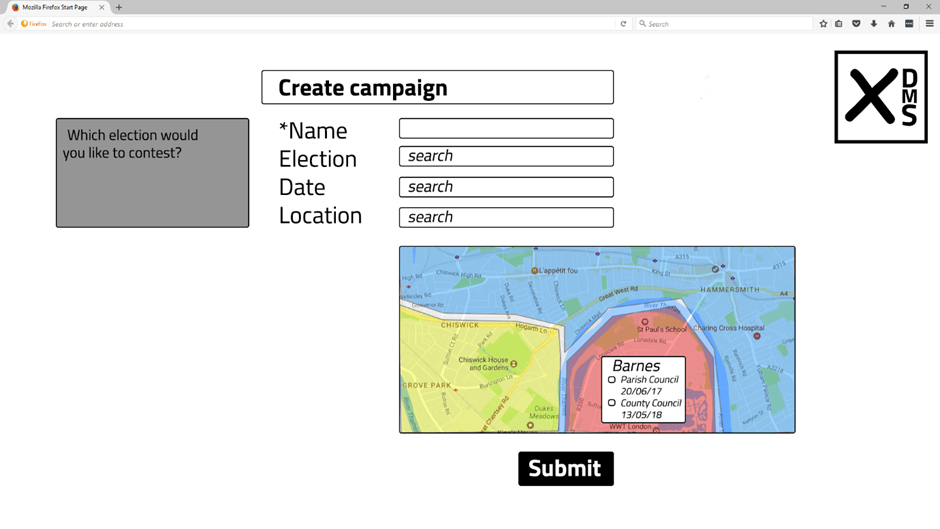
Account creation takes the user directly to a campaign creation page defaulting to a map view of local authorities close to the user’s password. The user can create a new campaign or search for and join an existing campaign by searching or browsing all upcoming elections in the area.
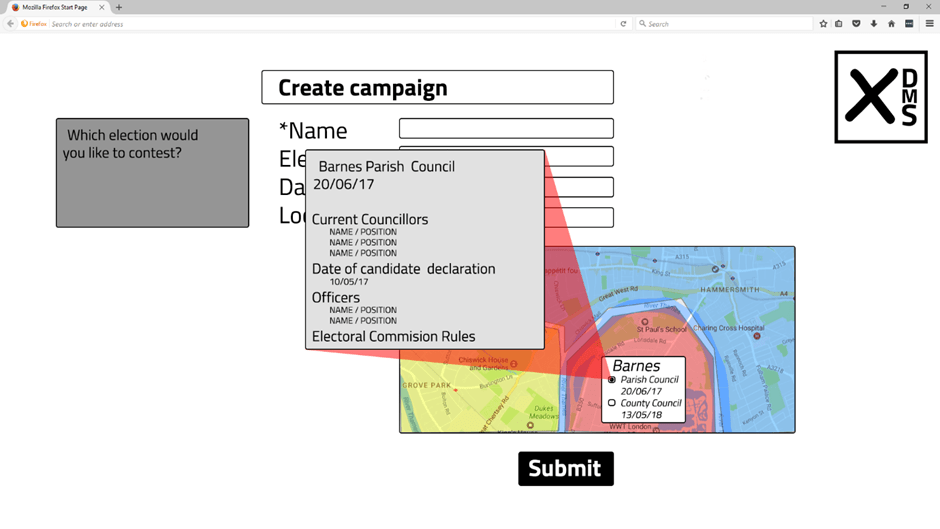
Clicking individual elections shown in the map view will launch a popup showing further known details.
**Details to come directly from Electoral Commission data feed?
3. Campaign Dashboard
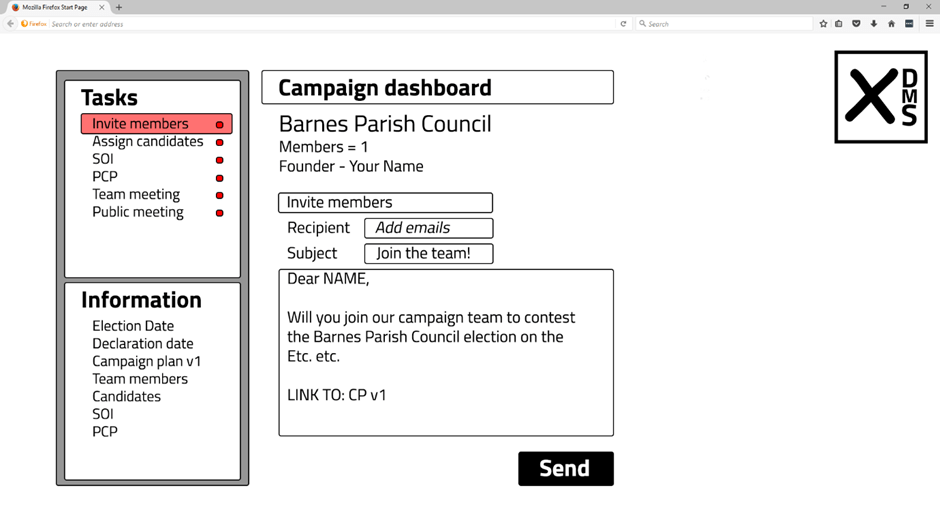
No campaigns can be created that are not linked to a recognised election in the system. Once the user has created or joined a campaign they are taken to a procedurally generated Campaign Dashboard, showing a list of outstanding tasks and known information about the campaign.
Task panel
Tasks are shown with traffic lights indicating; underway; completed; or pending. No task is compulsory. Team members can delete or ignore the system’s recommended tasks and create new ones of their own design.
Team communication
The first task presented to the creator of a new campaign is to invite others to join that campaign. It may be that an initial discussion among friends will already have taken place but it is not essential. The task automatically pulls a template email the user can compose from, describing the campaign, including the election date and the candidate declaration date, asking recipients to join via a personalised link.
The details of the campaign will be presented formally in the Campaign Plan v. 1 document, attached to the email.
This document is likely to have many missing information fields; confirmed names of candidates, Statement of Intent, Way of Working etc. But sharing the first version of the plan shows all team members that they are not starting from a blank slate; and highlights what upcoming tasks and decisions the team faces.
The message, when sent, will generate unique acceptance urls for each recipient, automatically associating them with this campaign when they register or log in. Those invited to join will be able to select their own level of involvement when they sign up; team member of volunteer.
The other proposed tasks generated by the system can be assigned and completed by any team member.
4. Shortlist potential candidates
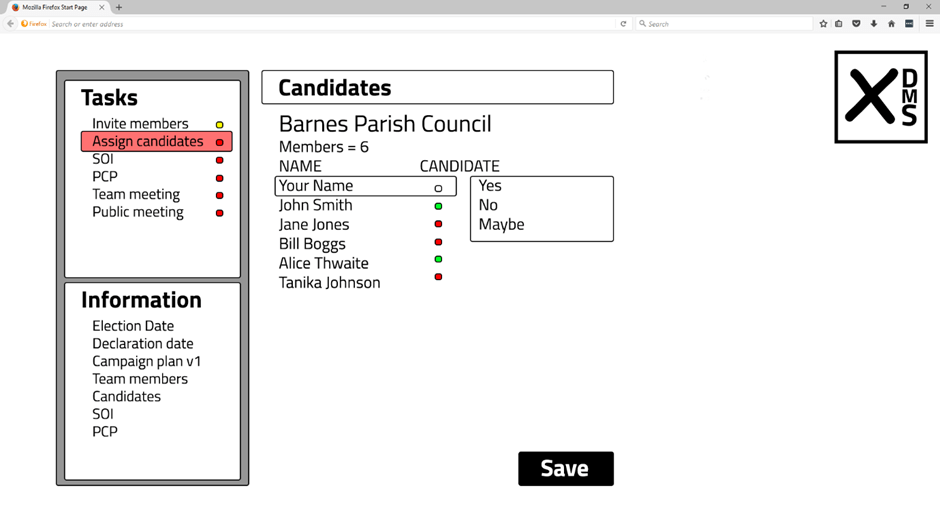
Anyone can put themselves forward as a potential candidate, or show they are not interested in standing.
The choice of whether to put yourself forward as a potential candidate or not can only be made by the individual team member; you cannot put someone else forward in the system. This is in contrast to the candidate assignment process once potential candidates are known, which allows any team member to draft their own proposed candidate list, with individuals attached to wards.
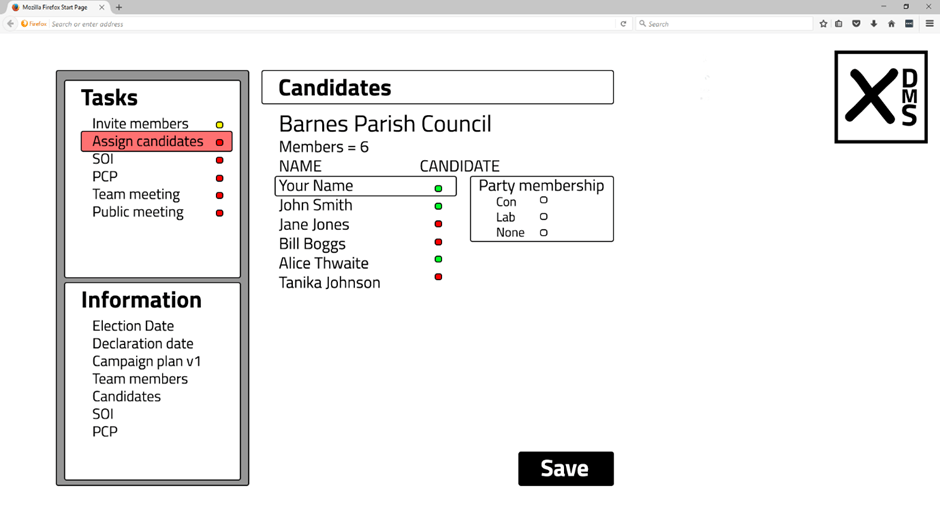
When someone does put their hat in the ring as a potential candidate they are required to disclose any political party memberships. DMS is available equally to party initiated campaigns and independent campaigns but party membership is considered to be a matter of public interest with reference to anyone declaring themselves as a potential candidate.
**What is the legal requirement for candidates and campaign volunteers to state their party memberships?
5. Schedule meeting
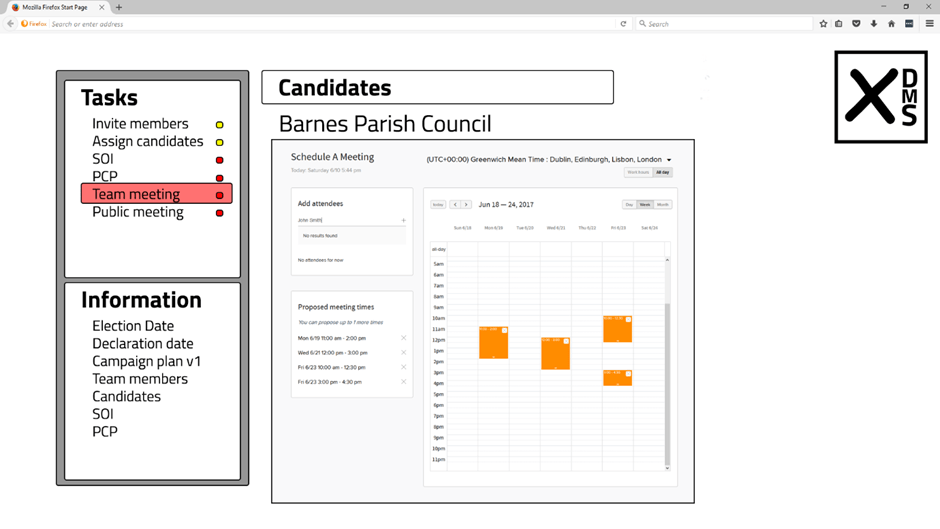
The DMS event management tool allows users to propose a range of potential dates for any individual event.
Invitees are emailed the potential options with a request to indicate which they can and cannot attend. The event organiser can then select the best time for all concerned or offer a new selection if no time and date works for the required attendees.
6. Online Meeting
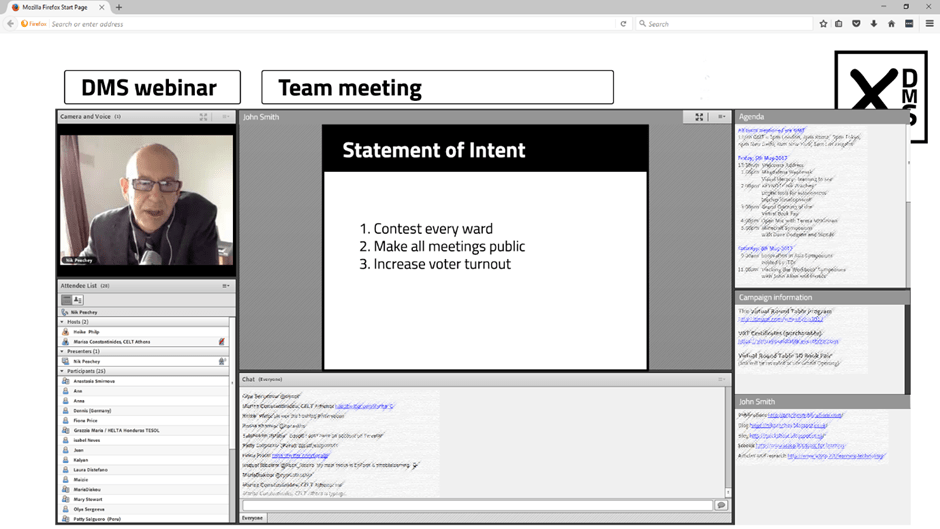
Any scheduled event, whether team meeting or public meeting, can be at a real world venue or just in a remote webinar format or both.
Real world events with a webinar adjunct can have the real world portion streamed live into the webinar frame.
The webinar must be managed by a moderator responsible for introducing speakers, giving speakers control of the mic and presentation screen, and organising question and answer sessions with participants.
Meetings can be tagged for recording and archiving or tagged as private with no public record. The status of the meeting will be visible to all delegates.
The DMS webinar application will include screenshare, webcam, group chat, private chat, VoIP, document sharing, automated minutes generation and a full suite of moderation tools.
7. Assign Tasks
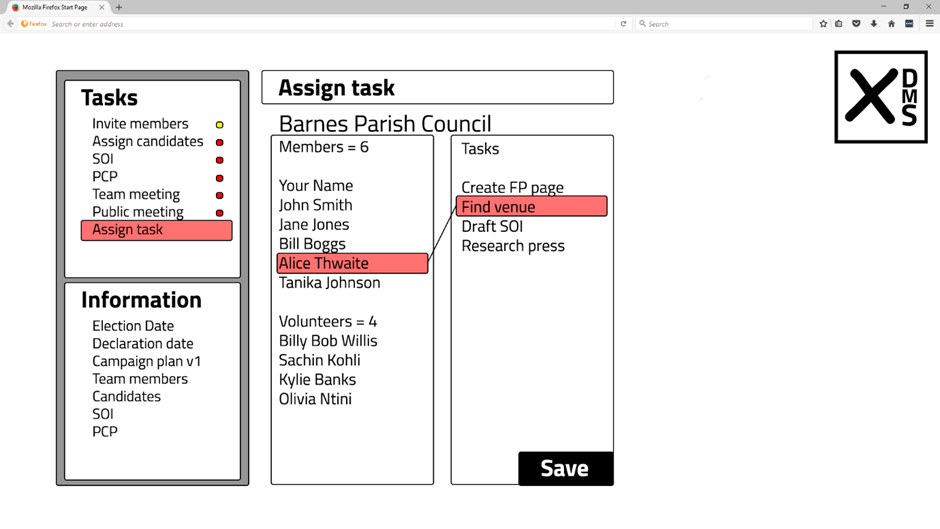
DMS is modular and largely optional. Any team member can create a new task and tasks can be nested to a tier one task like organising an event.
Once created, tasks can be viewed in list form next to team members, making it easy to highlight a task and drag it to a member, assigning the task to that person.
That person will get immediate notification on the task assigned to them and will be able to accept or reject the task.
Task and member lists can be browsed from any point; e.g. clicking on a member name will then show all tasks assigned to them.
Tasks, users and teams can also be shown in gantt chart format with dependencies and deadlines assigned.
8. Meeting tasks and templates
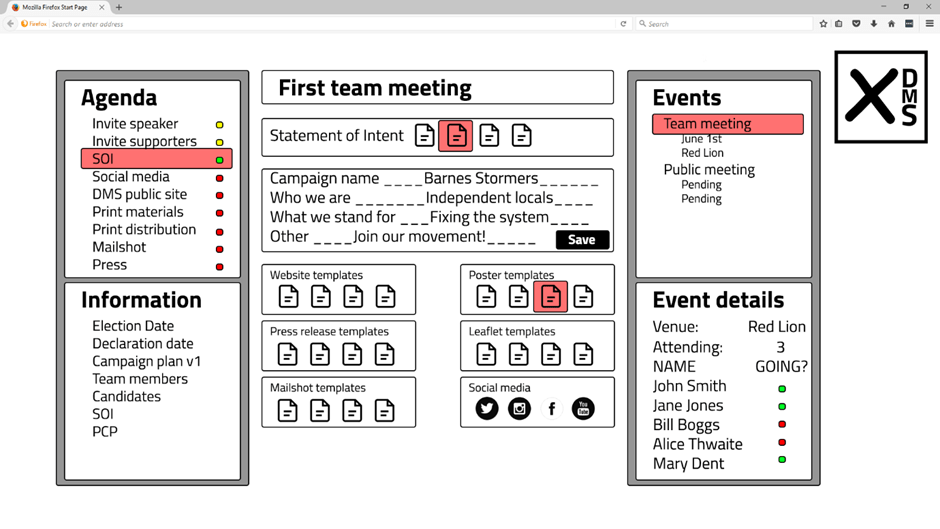
Creating the first team meeting generates an editable agenda of likely items, including tasks leading toward a first public meeting.
Tasks include creating a Statement of Intent; which can be drafted from scratch or from a library of templates (which will grow as the platform is used, with each past SOI available as a template).
Other communication templates are also available from within the system, including posters, press releases, campaign website templates and email marketing templates.
9. Dynamic media templates
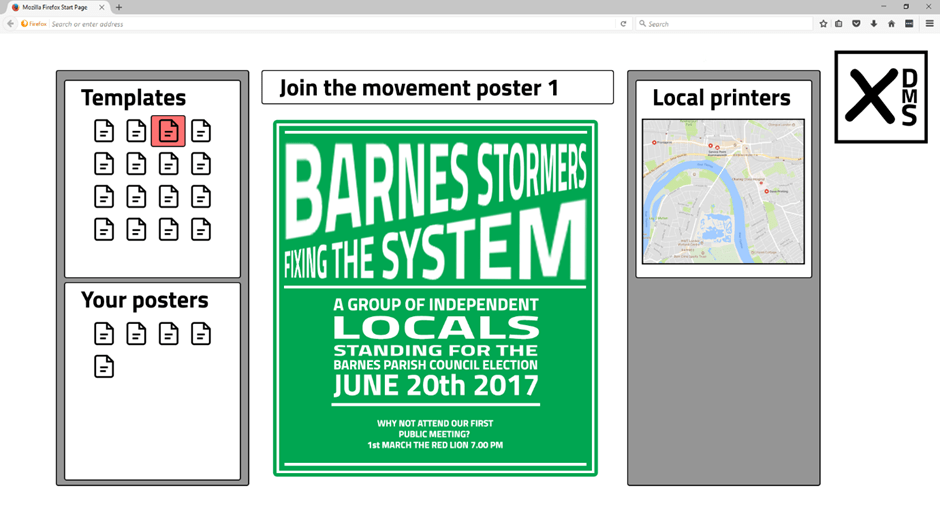
The platform’s templates contain dynamic fields, allowing procedural generation of materials from SOI, Way of Working and other approved campaign documents.
Team members can view their messages presented in different templates and easily refine before submitting finished versions to printers or publishing public campaign web pages.
10. Assign Candidates
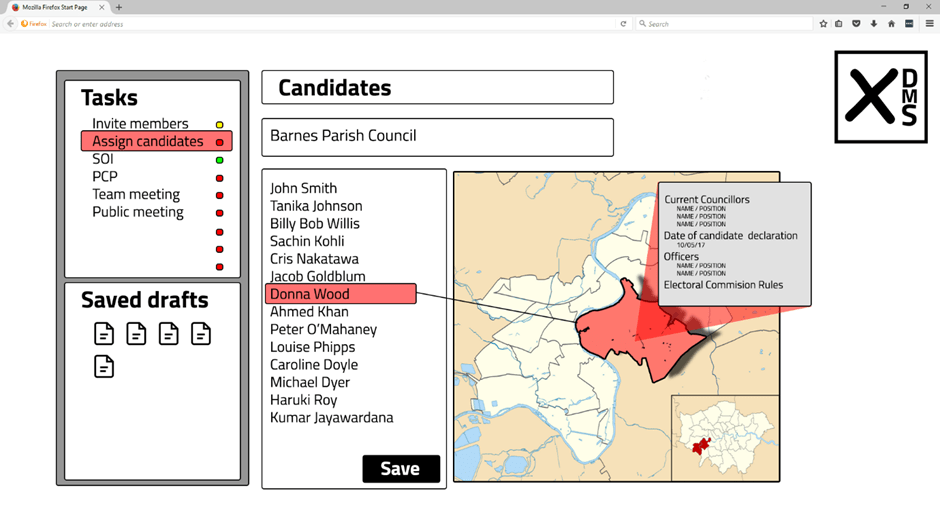
Once individual team members have put themselves forward as potential candidiates, any team member can then propose a campaign candidate list.
Simply opening the Candidate Assignment tool will show all potential candidates and a dynamic map view of wards. A proposed campaign candidate list can be generated by clicking a ward and dragging it to a candidate name or visa versa.
This view will also show postcode information for candidates and demographic information for wards.
It will also show incumbent councillors in each ward, party affiliations, and public information about the council officers. The map view will assist candidates in deciding which areas to focus their campaigning activities.
That proposed campaign candidate list can then be saved as a draft, with other drafts created by other team members, pending a final decision and the acceptance of one draft as the official candidate list.
11. Campaign commitments
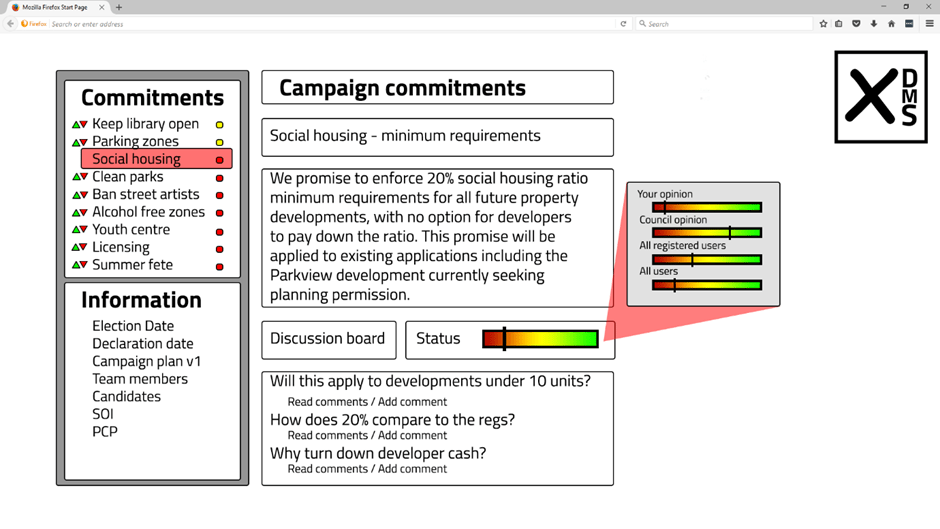
One of the optional content modules in the DMS will allow candidates to make Campaign Commitments.
These can be specific or vague but they will be available to the public to comment, vote up and down and assign collective status feedback on.
Each Campaign Commitment will be recorded as a permanent asset in the system. Each will have it’s own forum with registered users able to create threads and all users (including anonymous users) able to comment and assert their opinion on the completeness or otherwise of the commitment.
The candidate responsible for the commitment can set the commitment to “status closed” but that will not prevent the public from continuing to comment the issue.
This is a contentious part of the platform and it’s success depends on filtered views being easily available.
Trolls and anonymous contributors can be expected to try and disrupt or distort opinion. But all users will be able to filter prioritisation and comments by “All” or “Registered”
Candidates may deem commitments to be closed because they are no longer relevant or have been fulfilled. A swell of public opinion may require them to reopen an issue.
The crowd may accept the closure of unfulfilled commitments due to unforeseen circumstances but campaigns and candidates will always carry their commitment history within the system.
No candidates are obliged to make any commitments.
Conclusions
It is folly to assume technology can solve our social problems. But we cannot ignore the technology landscape either.
DMS is put forward as a form of freedom insurance.
If you sat down with a newly established dictator and conducted a detailed needs analysis of what they wanted from a technology platform you would pretty much get what we have today. Everyone is dependent on a centralised network for information, social connections, banking, healthcare and access to public services. That network is monitored and can be modified or switched off at will. The network administrators and anyone else with the money to fund social media campaigns peer directly into everyone’s private lives.
It doesn’t matter whether you think this was intended from the start, or whether this has emerged organically as the Internet has developed in a for-profit context.
We are not going to abandon the Internet; so we better make sure it works for us. We have few collective duties greater than ensuring we do not sleepwalk into authoritarianism.
Blithely creating the perfect infrastructure for an authoritarian regime and then gorging ourselves on box sets and casual gaming while populist, nationalist movements gain traction across the globe is no way to fulfil that duty.
 WORDS AND PICTURES
Leave a comment